Welcome to the LongMill MK3 open source page. The MK3 is open source, meaning we make our design files available to the public, and keep them updated with major design revisions.
The idea is for:
- Users to modify and improve their machines to fit their needs
- Machine owners to share their designs with the community to help others that have similar needs
- Makers to use our design ideas and design philosophy to create other types of machines, such as laser cutters, plasma cutters, and 3D printers
- Us to gain inspiration from the community to help us guide our development of current and future products and features
License
This is accomplished by putting the project under a Creative Commons BY-SA license:
- The entire mechanical design of our LongMill MK3 CNC available in a range of 3D file types and as drawings where applicable
- Any internal assembly jigs and other supporting hardware for the LongMill MK3
- All educational information provided within the LongMill MK3 Resources area including machine assembly instructions and modifications
- Every aspect of the electrical design behind our custom SLB-LITE CNC controller including BOM, schematics, gerber file, etc
- All this information is continually updated as the LongMill project continues to be revised, with more openly shared information being made available at each new major revision and licensing continuing to be applied to all previous major versions. By making this information available, the LongMill project fulfills the Open Source Hardware Association’s definition of open source hardware.
Here are the 3D CAD assemblies of the LongMill MK3 and SLB-LITE:
SLB-LITE design documents can be found here:
The models are hosted on the website/platform known as “Onshape”. This is the browser-based software that the engineers and designers on our team use to design and iterate on all the products we produce at Sienci Labs. The fact that it’s online has the great advantage that anytime we make an update or release a new product, you are able to see them live or download them for yourself. We feel this is a great way to keep our company open and make our designs easily accessible to others.
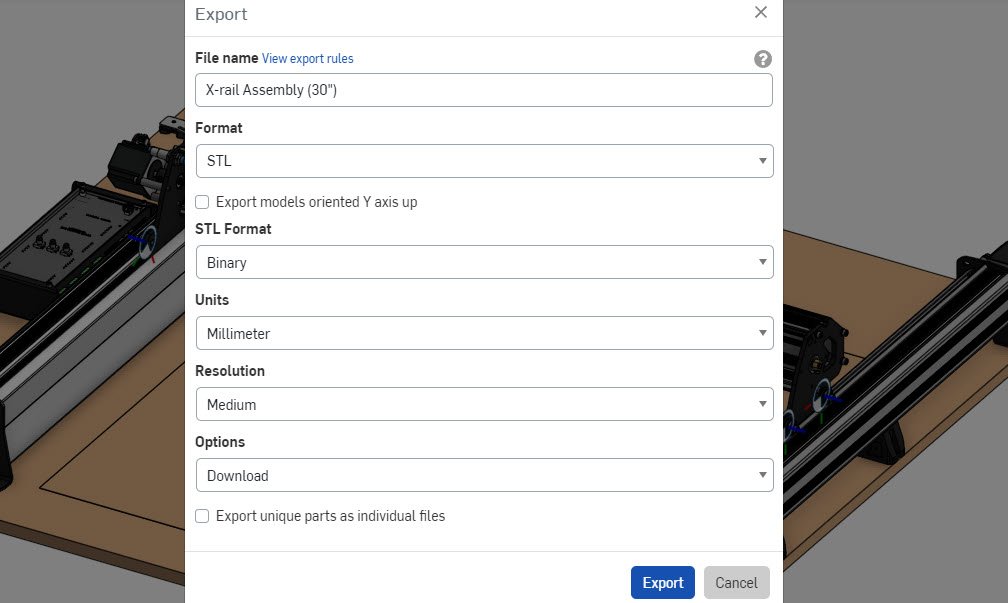
If you want to Export our Onshape designs as either a 3D model (STL, IGES, STEP) or a 2D drawing (DWG, DXF) for your own tweaks or accessories:
- Open the link to the design you’d like to download.
- Use the ‘Export’ option in the toolbar to either export the whole design or use the down arrow to allow you to export only individual parts or assemblies. You can select these parts by clicking on the 3D model or by clicking on the parts list on the left-hand side of the window. You can also select individual faces of parts or surfaces to export these as DWG or DXF files.
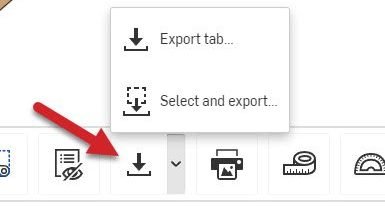
- When you’ve selected all your parts, you’ll be given more options to choose the file type you want to download as and other options based on your selections. Typically STLs are used for 3D printing, IGES and STEP are good for importing to other design software to modify the files, and DXF or DWG are used for laser or plasma cutting. Typically the other files defaults tend to be good to use.