

❗There is a lot of information to take in and learn and it can be overwhelming. Bookmark this page for easy access.Capabilities
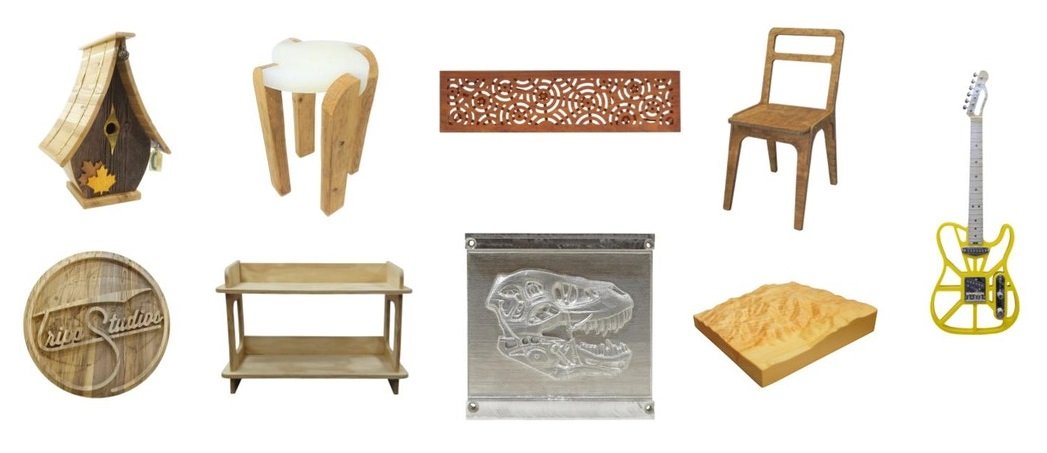
The LongMill MK2 is a benchtop CNC with most features any hobby user wants, even capable of bringing small-scale production within the comfort of one’s own shed or home shop. The balance of ease-of-use, cost, and rigidity is one that we think is fairly unique in the hobby CNC world, and when paired up with other accessories, serves green and more experienced CNC hobbyists alike. It can accomplish a variety of tasks such as:
- Large sign lettering or full sign routing
- Intricate v-carving and inlays
- Furniture work and joinery
- Slab flattening
- Children’s toys and household items
- Wall art and gifts to friends and family
The MK2 can comfortably carve a variety of materials including hard and soft woods, plastics, foams, and waxes. It can even produce acceptable work on soft metals like aluminum, bronze, copper, or can be equipped with other accessories like a drag knife, engraving tool, or laser diode to cut vinyl, card stock, cardboard, and engrave ceramics, glass, and metals.
Anatomy
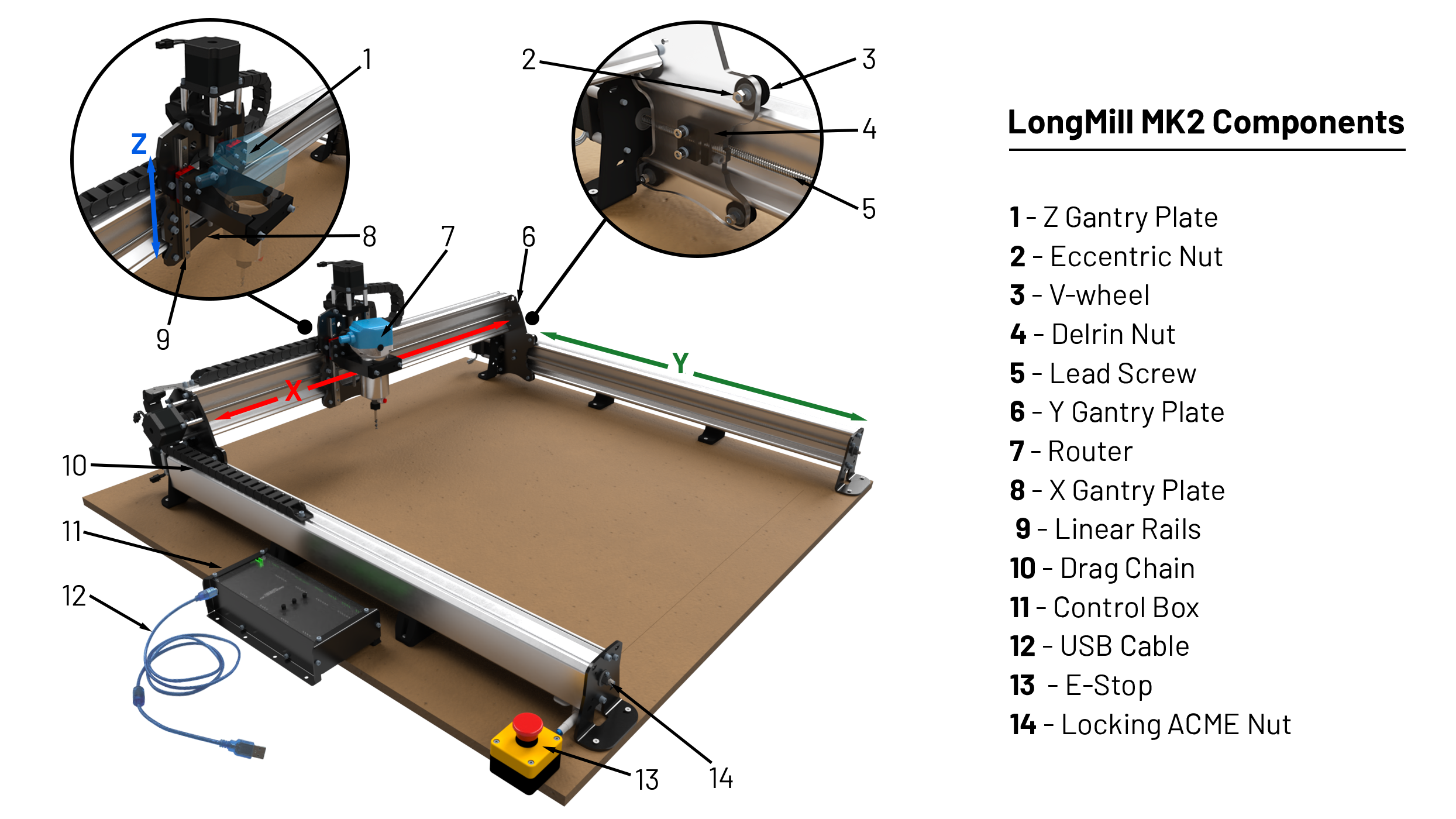
The MK2 is a 3-axis CNC that comes in three sizes. Each axis is lead screw driven to increase rigidity and maintain accuracy in the X-axis (left-to-right), Y-axis (forward and backward), and Z-axis (up and down, cutting into the material).
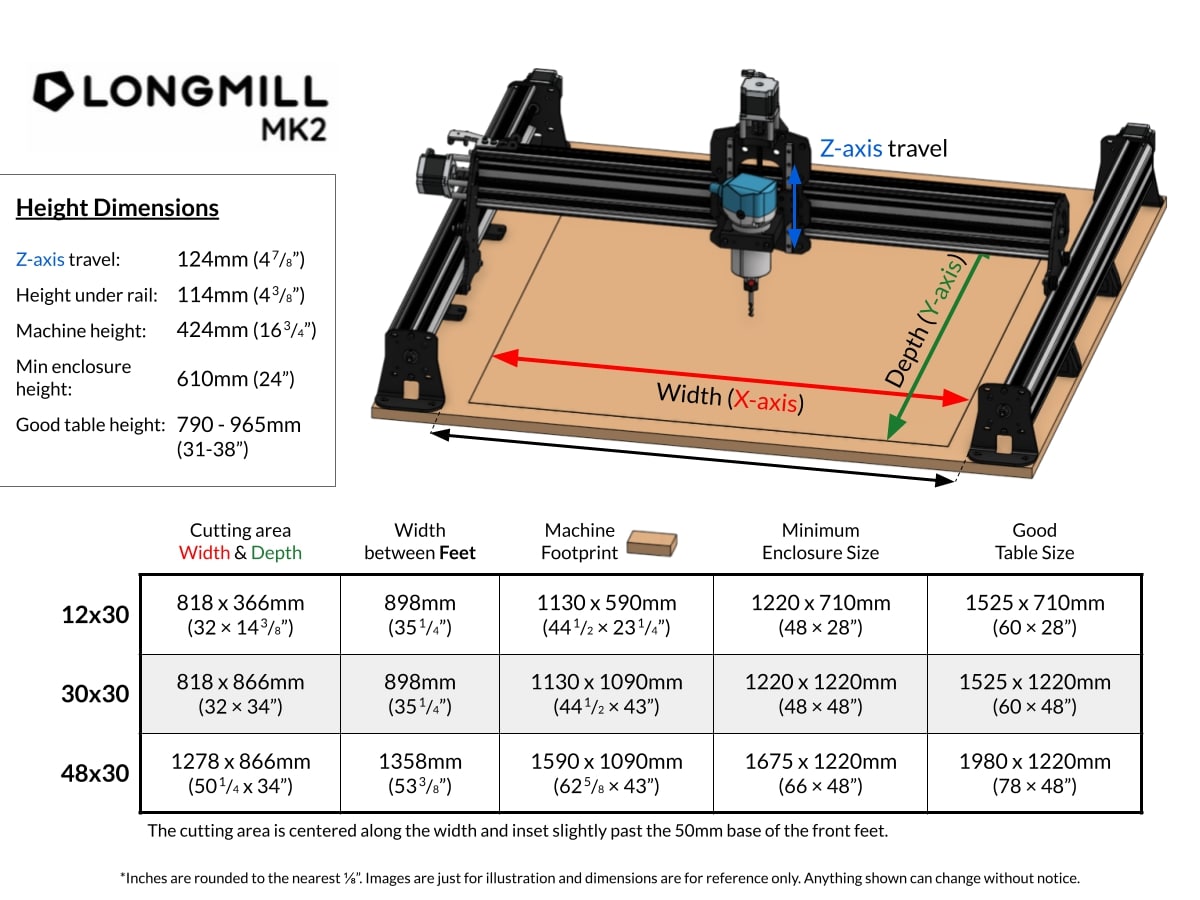
For complete dimensions see: LongMill MK2 Drawing PDF
📋 Specifications
Weight: ~30kg (70 lbs) not including MDF wasteboard plus other accessories
Power requirements: at 120V, two independent circuits to provide…
-
2.5A to the SLB controller
-
6.5A to the Makita router or the rating of whichever router / spindle you equipped to your MK2
-
Power to the desktop, laptop, mini-PC, or SBC (i.e. single board computer, like a raspberry pi)
AND
-
Power to your dust management system whether it’s a vacuum or dust collector
- This is a separate circuit to reduce static buildup or EMI issues
Operating temperature: expect reliable operation between 5 🠚30°C shop temperature (can be colder or hotter outside), as long as you give your machine time to acclimate to its environment to avoid cold-running and moisture build up on the electronics. Using these methods some users have reported running in as low as -20°C, though wireless mice or keyboards reportedly become unreliable.
Operating humidity: best results will occur from a balanced humidity (40-60%), too high and you can expect the moisture to degrade or even short the electronics, cause higher dust buildup, and swell the MDF wasteboard. Dry air can cause static charges to build up more easily, so a poorly grounded machine will experience electronic disruptions.
Storage: all components have a wide operating temperature range such as -20 🠚 50°C for the stepper motors, -40 🠚 120 °C for delrin parts, -40 🠚 85°C for the control box, and -40 🠚 105 °C for the motor connectors. As long as the MK2 is kept stationary and at a mild ambient humidity (40-60%), it can survive being stored at nearly any temperature.
Max cutting speed: 4000 mm/min (157.5 ipm) in X and Y, 3000 mm/min (118.1 ipm) in Z.
X & Y-axis motion: Delrin v-wheels on high rigidity extruded aluminum rails with custom adjusting eccentric nuts.
Z-axis motion: MGN12 recirculating ball bearing linear guide blocks, running on precision ground hardened steel rails.
Power transmission: 12.6kg-cm (175oz-in) NEMA 23 steppers driving 4-start, 2mm pitch, 8mm lead, 8mm diameter ACME lead screws via anti-backlash tensioning nuts to 6.35mm (1/4″) steel gantry plates.
Router / spindle: can run in 15000 – 25000 RPM range with reliable speed feedback, 0-5V PWM control for spindles. Router / spindle cannot exceed 2.7kg (6 lbs).
Electronics: SuperLongBoard 5xHAL uses an STM32F412 chip running grblHAL powering four TMC2660C motor drivers. The LongBoard uses an Arduino Uno running grbl v1.1h powering four 4A TB6600 motor drivers.
📖 Prep for your MK2
- Familiarize yourself with fundamental CNC concepts and workflows
- Dive into understanding CNC software, and set up your post processor
- Bookmark these pages to refer to after your LongMill assembly
- Add-ons installation and usage guides (e.g. AutoZero touch plate, gControl panel)
- How to do maintenance on your LongMill
- Feeds and speeds for various material and bit types
- Step by step instructions on how to run a CNC job
- Finishing techniques after you’ve cut out your project
- Determine what computer you would need, if you are not getting gControl panel
- Consider which workholding methods to use
- Source cutting tools for the types of projects you’re interested in making
- Figure out your dust collection system
- Take precautions and grab safety gear to protect your eyes and ears
- Grab 3/4″ MDF sheets for mounting your table surface
- Looking for table ideas? See these designs made by fellow community members
🗪 Community Support
We’ve got a great online community that is well worth visiting and being a part of. Have questions about the machine, machining techniques or how to use some software, this is the first place to start. If our knowledgeable community can’t help, Customer Support surely will.
- Sienci Community Forum – A great information resource and a place to connect with like minded customers
- Sienci Facebook Group – Another great resource and place to show off your projects
If you haven’t, check out our YouTube channel and our affiliated customers – we can’t say enough how helpful and useful they are!
- Sienci Labs YouTube – Our own channel with product updates, repair guides and tutorials
- IDC WoodCraft – Garrett Fromme
- Bucky’s Customs
Community Modifications
If there are any known noteworthy designs or modifications made to the LongMill, they will be posted here. This is to make the information needed for modification more accessible and to also thank and recognize users and community members who have made an impact on the LongMill CNC project.